
One of the biggest misconceptions about my Facebook page is that I spend my life writing social media posts. I used to. I don’t now.
For a long time I was posting every single day, doing it all manually. I dipped in and out of Meta Business Suite, but always found it clunky and difficult to work with. Now I use a social media scheduler to create, schedule and recycle content across my holiday lets and wider small business, and it has cut the time I spend on social media enormously. If posting is another job sitting on your list, I want you to know it doesn’t have to be, and this works across Facebook, Instagram, TikTok and LinkedIn, not just one platform.
The tool I use is Publer, a social media scheduling platform that lets me create, schedule, recycle and organise posts across Facebook, Instagram, TikTok, LinkedIn and more. I originally started using it for my holiday let marketing, but I now use it across my wider business too.
What is a social media scheduler?
A social media scheduler lets you create your posts in advance and choose when they will be published, rather than logging into Facebook, Instagram or another platform every time you want to post.
Better schedulers also let you collect media, reuse successful content, organise posts in a calendar, add comments before posting and publish across several platforms from one place.
Key things to remember
People buy from people. If you can save time reposting or scheduling great content in a more efficient way, you buy yourself more time to interact genuinely and personally in the comments of your posts and work the groups. If you aren’t finding the time to do that, prioritise it.
Posting something twice isn’t cheating. Only a small portion of your following ever sees any single post, so reposting something doesn’t mean the same people see it again; in fact, it’s very unlikely they will. If you posted a photo of your tulips in 2025 and thought, that was lovely, there is nothing wrong with posting it again in 2027. Most of your audience will never know, and the ones who do remember probably won’t mind.
Post deliberately, not just because you think you should. If you don’t know what to post in the first place, which is exactly what Facebook Fix, the course for marketing your holiday let on Facebook is there to help with.
Is this even for you?
I started looking for a social media scheduling tool when I was posting 5ish times a week and realised there was probably a more efficient way. It pays off if you’re posting perhaps twice a week and you’re trying to do anything beyond the basics.
There are really two signs it’s worth looking at: you’re spending time hunting for old content and lining things up again, or you’re finding your posting inconsistent. Both were true for me.
My Publer review after using it in my own small businesses
I use this in my holiday let and coaching businesses, but the system works for any small business posting regularly on social media.
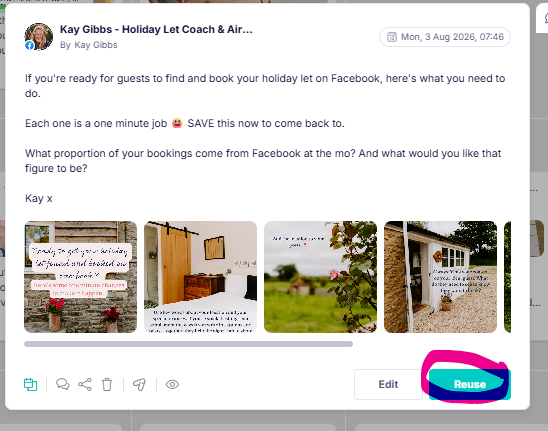
When I signed up, it imported every post I’d ever written, media and all, without me having to do anything beyond clicking a couple of buttons. There’s no fiddling about looking for a photo you saved somewhere or hunting for text you wrote weeks ago, it’s all just sitting there, ready to reuse. Some of it I repost exactly as it was. Some gets a quick update. Some just gives me an idea for something new.
How I use social media scheduling for my holiday lets
For holiday lets, this works particularly well because so much holiday let content is evergreen or seasonal. A post about the beach, a favourite local café, the enclosed garden, dog-friendly touches or spring flowers doesn’t suddenly become useless because it’s been posted once.
I can build up a bank of genuinely useful holiday let content, then bring the best posts back around at sensible intervals. I still add new posts, current availability and things happening locally, but I’m not constantly starting from a blank page.
When I want to, I create new content within the scheduler. It’s an easier interface to use than Business Suite and enables me to import pics straight from my phone or desktop (there’s a phone app I can add media to whenever I have an idea and then pick it up on the desktop next time I’m scheduling).
Repeating my best posts automatically. I pick a post that’s genuinely worked before and set it to go out again on a cycle, say every 11 months, so it comes round without landing on the exact same date every year.
Filling a fixed weekly slot. My Sunday post promoting things from Amazon started well simply because you’re all doing your next week’s shop on a Sunday evening, and it’s been running on autopilot in that slot for months now.
Adding the link in the first comment while I schedule, not after. If you add a link into a Facebook post, it will impinge reach, so fewer people see it, and on Instagram you can’t add a link into the post at all. Adding it as the first comment avoids that. With Meta Business Suite you’d have to remember to do that manually the moment a post goes live; this way it’s simply part of scheduling it in the first place.
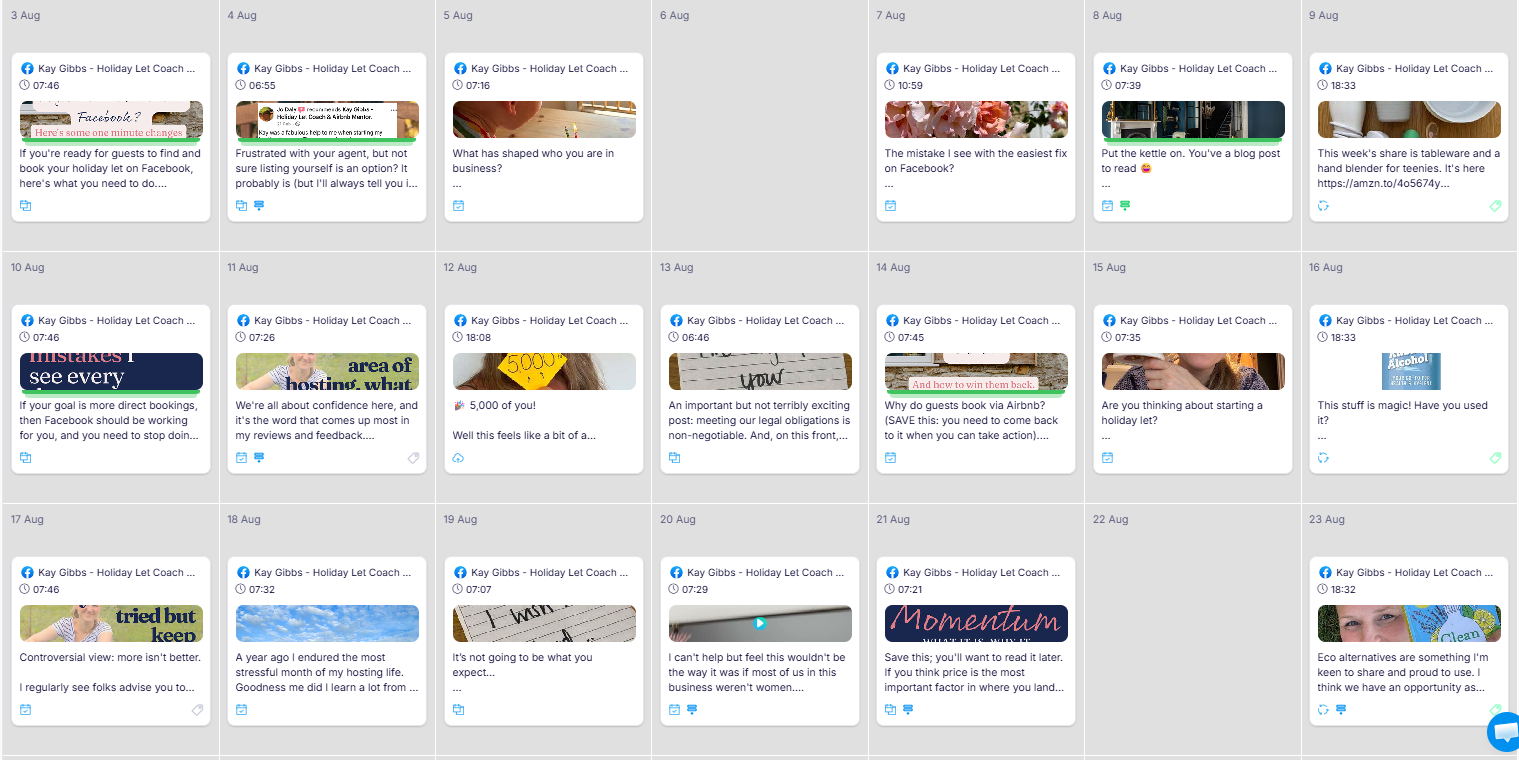
The calendar. I love that I can see the whole month at a time and literally drag posts around when I want to move them. It’s incredibly easy.
The cost
It’s about a fiver a month for one account, and you can add more to link it to Instagram, TikTok, LinkedIn and more, not just Facebook. If you run more than one set of accounts (ie two holiday lets) you can use the same media across both too, amazing!
I estimate that I’m spending less than 10% of the time on social media that I was 18 months ago, and that saving just keeps compounding going forward. I have posts scheduled for five years time! 😂 If I had to give up every other tool I use across my businesses, this would be the very last one I’d let go of.
Here’s a video of my quick tour of how I use it, and here’s the link that gets you 5% off your subscription forever. This is an affiliate link; I was delighted to find that I can earn a few pennies for sharing something I absolutely adore with you. I’ll pop some FAQs below too.
Kay x
P.S. If you’re looking for confidence & clarity in every decision, weekly prompts, personalised input & feedback and a chance to grow in a community of wonderful, like-minded hosts, join Confident Host Circle, my online membership designed for women like you.
Please note that this post contains an affiliate link for Publer; I earn a small commission if you sign up through it, at no extra cost to you. I only ever recommend tools I use and love myself.
Publer review: frequently asked questions
What is Publer and what does it actually do?
Publer is a social media scheduling tool that lets you create, schedule and manage posts across platforms including Facebook, Instagram, LinkedIn, TikTok and more.
I use it predominantly for Facebook and the real benefit for me goes far beyond simply scheduling posts in advance. I can see my whole content calendar, reuse old posts and photos, automatically repeat my best content, move posts around by dragging them to a different date and manage everything from one place.
It has effectively turned years of social media content into a bank of assets I can keep using rather than things I post once and lose.
Is Publer worth paying for if Meta Business Suite is free?
It depends how much you’re posting. The pricing is so reasonable that in almost every case the answer is yes.
If you post on Facebook or Instagram occasionally, Meta Business Suite may be all you need. I started looking for something else when I was posting around five times a week and realised how much time I was spending finding old posts, locating photos, rescheduling things and generally fiddling about.
For me, Publer became worth paying for very quickly because it saves considerably more in my time than it costs.
I’d particularly look at a social media scheduler if you’re posting at least a couple of times a week, your posting is becoming inconsistent or you’re repeatedly trying to find and reuse content you’ve already created.
Can Publer reuse my old Facebook posts?
Yes, and this was one of the biggest wins for me.
When I joined Publer, I was able to import my previous Facebook posts and media, including content I had created long before I started using it.
That means I can find an old post that worked well, click to reuse it and either post it again as it was or change the text, photos or both.
I used to tell people to reuse good content while knowing that actually finding the original post, tracking down the photo and recreating it could be a complete faff. Publer removes most of that faff.
Can Publer automatically repeat my best social media posts?
Yes. This is probably my favourite feature.
If I’ve created a genuinely good evergreen post, I can schedule it to come around again automatically. I quite like intervals such as every 11 months because it brings the content back roughly annually without it appearing on exactly the same date every year.
For a holiday let, that might be a brilliant post about a local restaurant, your enclosed garden, how comfortable the beds are, a guest hamper or something special to do nearby.
The important bit is not to automate rubbish. I look at how a post performed first, then choose the content that deserves another outing.
One good post should not have to work for you only once.
Can Publer schedule the first comment on a Facebook post?
Yes, and this is one of those tiny features that makes a surprisingly big difference.
When I schedule a Facebook post in Publer, I can also write and schedule the first comment at the same time. That is particularly useful when I want the main post to say something like “link in the comments”.
Without it, I would have to remember when the post was publishing, go back into Facebook and manually add the comment afterwards.
I don’t want my business to contain jobs that rely on me remembering to pop onto Facebook at 7.32pm. If software can do that bit for me, it absolutely should.
Can I use Publer on my phone as well as my computer?
Yes. There is a Publer app as well as the desktop version.
I prefer doing most of my scheduling on a computer because I like writing on a proper keyboard and being able to see the whole calendar clearly.
Where I find the app particularly useful is collecting photos.
Previously, if I took a picture on my phone that I wanted to use in a properly written post later, I might WhatsApp it to myself, open WhatsApp on my computer, download it and then upload it into my scheduler.
Now I can simply add the photo to my Publer media library from my phone. When I next sit down at my computer, it’s already there waiting for me.
It’s a small thing, but removing lots of small bits of friction is exactly how I’ve reduced the amount of time social media takes me.
Is Publer useful if I manage more than one holiday let or social media account?
Very.
You can connect multiple social media accounts and use the same media across them, which is particularly useful if you have more than one holiday let.
You might have photographs or posts about the same local attraction, beach, restaurant or event that are relevant to several properties. Rather than starting again for every account, you can reuse the content and schedule it for different pages on different dates.
The price increases as you add more accounts, so I’d still only add accounts where the time saving genuinely warrants it.
Does using a social media scheduler make your content less personal?
I think it can do the opposite.
I don’t want to automate the relationship-building part of social media. I want to automate the repetitive admin around it.
If Publer saves me time finding photographs, reposting good content, moving posts around and remembering to publish things, I can spend more time replying properly to comments, talking to people in groups, answering questions and getting to know the people who follow me.
People buy from people. The purpose of scheduling isn’t to remove you from your social media. It’s to stop the mechanics of posting taking up the time you could be spending actually talking to people.
Is Publer good for holiday let owners?
I think it’s particularly well suited to holiday lets because so much of our content has a long life.
A beautiful view doesn’t stop being beautiful because you posted it last year. Your favourite local pub is still worth talking about. Guests still want to know about the garden, the beds, your dog-friendly touches, things to do nearby and the little details that make your property special.
That means you can gradually build a really useful bank of content rather than constantly feeling that you need to think of something new.
You still need fresh content, personality and timely posts. Publer simply lets the good stuff you’ve already created keep earning its keep too.